AI Video Generation: Create Cinematic Product Demos and Social Clips
Generate professional-quality videos from text prompts using ImageLayer's video generation. From product showcases to social teasers — cinematic results in under two minutes.
Professional video is expensive. Agencies and studios often quote $500–$5,000 per finished minute once you factor in scripting, location or studio time, crew, editing, revisions, and delivery formats. For product teams shipping features weekly and developers embedding content into apps, that cost and lead time rarely scales.
AI video generation compresses that loop: describe the shot, set duration and resolution, and get a render in minutes. ImageLayer’s embeddable widget offers images, video, audio, and text in your app without wiring providers yourself. Production video runs on Google Veo 3.1 via Vertex AI, with Veo 3.1 Fast as the default path for short, high-quality clips—demos, social, and brand motion.
This guide covers video templates, six workflows with prompts we actually ran, prompt tips, and credits pricing.
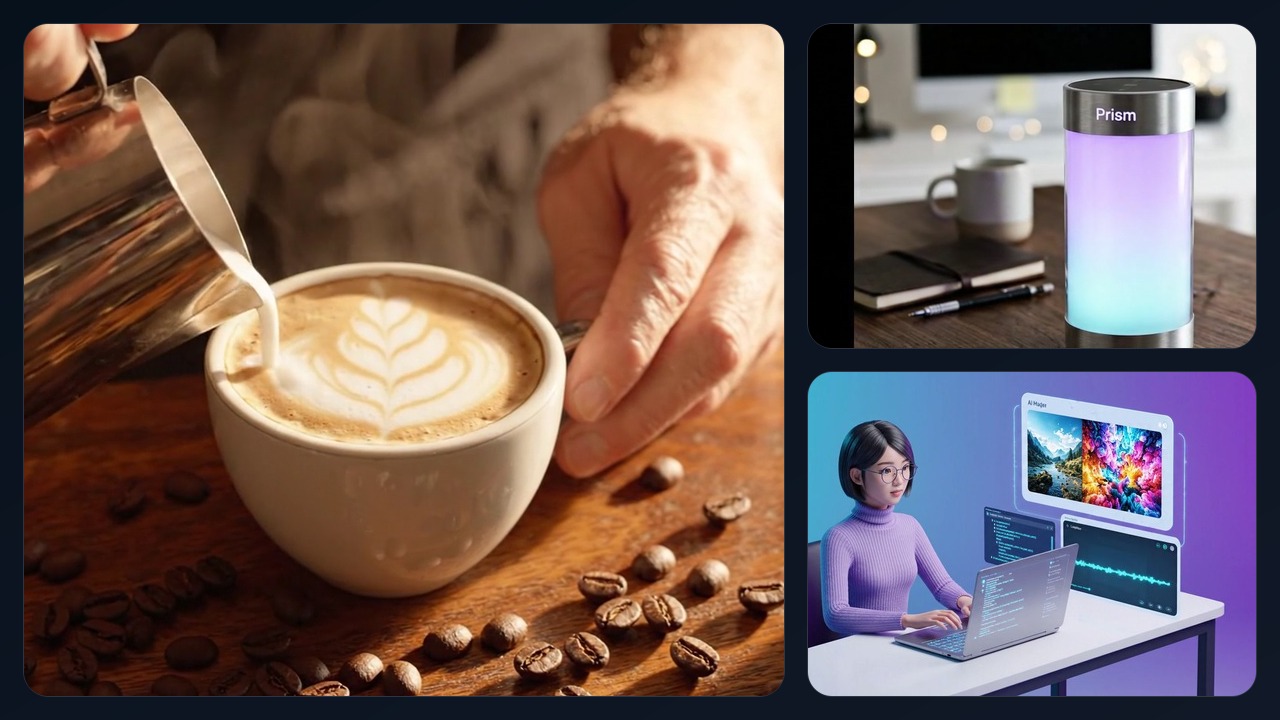
Real video examples generated with ImageLayer: a coffee social teaser, a product demo, and an explainer clip.
Video content type templates
Built-in video templates surface fields aligned with how teams brief video—so you are not starting from a blank box:
- Product Demo — Showcase hardware or software with camera movement, materials, and environment.
- Social Teaser — Fast-paced cuts, mood, and platform-friendly pacing.
- Brand Intro — Logo reveals, typography, and motion graphics language.
- Explainer Clip — Clear visual storytelling for concepts or flows.
- Announcement — Launch and news-style framing.
- Atmosphere / Scene — Mood, setting, and ambient storytelling without heavy product focus.
Each template weights subject, setting, tone, and motion differently. Match the template to the job to cut iteration cycles.
Step-by-step: Product demo video
Here is a full run-through for a product demo clip using Veo 3.1 Fast.
-
Set Output mode to Video.
-
Choose Model: Veo 3.1 Fast.
-
Upload your best product still as a source image to anchor the shape, materials, and environment.
-
Use this prompt (verbatim):
“Create a realistic cinematic product video of the exact smart lamp shown in the source image. Keep the same cylindrical brushed aluminum body, frosted glowing core, proportions, and premium finish. The lamp stays physically stable on a clean dark walnut desk in a minimalist home office. The camera performs a slow subtle three-quarter dolly arc with a gentle push-in, no full spinning turntable, no wobble, no shape changes. Ambient glow transitions naturally between warm amber, soft violet, and cool teal. Professional studio lighting, shallow depth of field, realistic reflections, tasteful premium tech aesthetic.”
-
Set Duration to 8 seconds.
-
Set Resolution to 720p.
Generated result: Prism smart lamp product demo — 8 seconds, 720p
Result: ~90 seconds to complete, 12 credits. Enough speed to iterate lighting and camera before locking a hero for web or in-app. Once the motion is approved, you can click Add voiceover on the finished preview and turn the same clip into a merged narrated MP4.
Step-by-step: Social media teaser
Same Video mode and Veo 3.1 Fast. When the hero shot needs realistic motion — hands, pouring, physics — text-to-video lets the model decide the physics frame-by-frame. Prompt:
“Cinematic artisanal coffee brand teaser for NovaCraft. A barista hand tilts a steel milk pitcher and pours steamed milk into a wide ceramic cappuccino cup, creating a leaf latte art pattern on the surface. The camera starts overhead looking straight down and slowly glides to a three-quarter angle as the pour finishes. Roasted coffee beans are scattered on the warm wooden counter beside the cup. Warm golden morning light from a window, rich brown and cream palette, shallow depth of field, realistic steam, appetizing café atmosphere. Shot on a professional cinema camera. No beans falling into the drink.”
Duration 8s, 720p. Cost: 12 credits. For food and drink shots with barista motion, text-to-video delivers more convincing physics than animating a static still.
Generated result: NovaCraft coffee social teaser — 8 seconds, 720p
Step-by-step: Brand intro animation
Video + Veo 3.1 Fast. Specify typography, palette, and how elements assemble. Prompt:
“Elegant logo reveal animation for Wavelength podcast brand. The word Wavelength materializes from flowing audio waveform particles that pulse and converge. Deep navy background with electric blue and soft purple gradient accents. Sound wave visualization ripples outward as letters form. Clean modern sans-serif typography. Premium motion graphics quality with smooth particle physics.”
Duration 6s, 720p. Cost: 10 credits—often enough for a stinger; extend in a second pass if needed.
Generated result: Wavelength podcast brand intro — 6 seconds, 720p
More examples: Explainer, Atmosphere, Product
Three more templates in action — each with the exact prompt we used.
Explainer Clip
A developer-workflow explainer in isometric 3D. 8 seconds, 720p, 12 credits.
Polished 3D product explainer for an AI media generation widget. A woman developer sits at a desk working on a laptop with a visible code editor. To the right of the laptop, a floating preview panel appears clearly separated from the screen and shows AI-generated images appearing in sequence. Then two additional floating cards appear one after another: a short video preview card and an audio waveform card. Keep all floating UI cards clearly separated from the laptop, with clean spacing and no overlapping or merging objects. Soft purple-to-teal gradient background, modern tech aesthetic, smooth motion graphics, premium startup product video, isometric 3D style.
Generated result: Widget explainer — 8 seconds, 720p
Atmosphere / Scene
A mood-first establishing shot with no product focus — useful for hero backgrounds and brand openers. 8 seconds, 720p, 12 credits.
Cozy coffee shop interior establishing shot. Camera slowly drifts through a warm cafe with exposed brick walls and hanging Edison bulbs. Morning sunlight streams through tall windows. Steam rises from cups. Slow dreamy camera movement. Cinematic shallow depth of field. Warm amber color grading.
Generated result: Coffee shop atmosphere — 8 seconds, 720p
Product Demo (Alternate)
Same template, different product — a luxury watch to show how the product-demo template generalizes. 8 seconds, 720p, 12 credits.
A cinematic product showcase of a minimalist titanium watch with matte black dial and mesh strap. The camera smoothly orbits to reveal the watch face catching light reflections. Shot against a slate gray surface. Professional studio lighting, shallow depth of field. Light glints off the sapphire crystal. Premium luxury aesthetic, 4K quality.
Generated result: Titanium watch showcase — 8 seconds, 720p
Pro tips for better videos
Write like a director, not a tagline. Name the camera behavior: orbit, dolly, push-in, handheld, aerial. State subject, environment, and what should stay sharp in frame.
Light and lens matter. Phrases like “soft key light,” “rim light,” “golden hour,” “shallow depth of field,” and “clean background” consistently improve perceived production value.
Color grade in words. Call out a palette or reference (e.g., warm browns and cream, teal and orange, muted corporate neutrals) so the grade stays consistent with your brand.
Duration: For product and social clips, 6–8 seconds is a practical sweet spot: long enough for a micro-narrative, short enough to iterate quickly. Go shorter for logo stingers; extend only when the brief truly needs more beats.
Iterate on one axis at a time. If motion feels wrong, adjust camera and pacing before you rewrite the entire scene description.
Pricing
Expect 8-12 credits per video at 720p on Veo 3.1 Fast (roughly 32-64 cents in underlying provider cost at current rates). 1080p and the higher-fidelity Veo 3.1 Quality tier cost more, but the default fast path is still far below traditional per-minute production pricing. Available on Starter and Pro+; Pro+ includes 1080p for large screens or paid media.
Confirm monthly credits in the dashboard before batch runs—whether you are testing solo or serving users via the widget.
Keep exploring
- Brand Guidelines for Video: How a Luxury Brand Keeps AI Content On-Brand — Side-by-side comparison of generic vs branded video output.
- How a B2B SaaS Brand Creates On-Brand LinkedIn Video — Brand guidelines applied to B2B LinkedIn video content.
- Add AI Voiceovers to Generated Videos: The Complete Workflow — Add a voiceover to a finished clip and download a merged narrated MP4.
- From Zero to Product Launch: Creating a Complete Demo Package with AI — Full Prism launch kit with prompts and credits.
Next steps
Run the examples in the playground. For embedding, auth, and API details, see documentation.
Ship by matching the template to the use case, keeping camera, light, and color explicit. Treat output as a strong first cut—fast on cost and calendar versus traditional production, with your brand judgment still in the loop.