From Zero to Product Launch: Creating a Complete Demo Package with AI
We built a full product launch kit — demo video, product photography, voiceover, and marketing copy — for a smart lamp using ImageLayer. Here's every prompt and result.
Launching a hardware product is rarely a single deliverable. You need a demo that shows the object in motion, photography that reads as retail-grade, ad-ready voiceover, and copy that ties the story together. For a small team or pre-revenue startup, a traditional production pass often lands in the $5,000–$10,000 range once you account for videography, studio time, retouching, talent, and copywriting—and the calendar cost is measured in weeks, not hours.
We wanted to see how far a single workflow could go. Using ImageLayer (images, video, audio, and text in one embeddable widget), we produced a complete Prism launch kit—in under ten minutes—with every prompt documented below.
The product: Prism
Prism is a fictional smart ambient desk lamp: a cylindrical form in brushed aluminum, with a color-shifting LED core that moves between warm amber, soft violet, and cool teal depending on mood and scene. The aesthetic is premium and restrained—something that could sit on a dark walnut desk in a modern home office without shouting for attention.
Demo video
We used Video mode and fed the product still back in as a source image so the motion clip stayed faithful to the same lamp silhouette, materials, and desk setup.
Settings: 8 seconds, 720p, 12 credits.
Prompt (verbatim, paired with the product still as the source image):
“Create a realistic cinematic product video of the exact smart lamp shown in the source image. Keep the same cylindrical brushed aluminum body, frosted glowing core, proportions, and premium finish. The lamp stays physically stable on a clean dark walnut desk in a minimalist home office. The camera performs a slow subtle three-quarter dolly arc with a gentle push-in, no full spinning turntable, no wobble, no shape changes. Ambient glow transitions naturally between warm amber, soft violet, and cool teal. Professional studio lighting, shallow depth of field, realistic reflections, tasteful premium tech aesthetic.”
This run leans on image-to-video rather than raw text-to-video. The still locks the product identity; the prompt then controls camera behavior (slow dolly instead of a full spin), product truth (materials and glow transitions), and set dressing (walnut desk, blurred office) so the motion clip matches the same world as the product photo.
Generated result: Prism product demo — 8 seconds, 720p, 12 credits
Product photography
For stills that could anchor a PDP, email hero, or paid social static, we switched to Image mode and biased toward catalog-style clarity.
Settings: 1:1 aspect ratio, 4 credits.
Prompt (verbatim):
“Product photography of a sleek cylindrical smart lamp called Prism with brushed aluminum finish, glowing with a soft purple-teal gradient ambient light. Set on a dark walnut desk in a minimalist home office. Shallow depth of field, studio lighting from the left. Premium tech product aesthetic.”
This complements the video: same desk language and lamp silhouette, but optimized for readability at thumbnail scale and print-like sharpness on the product surface.
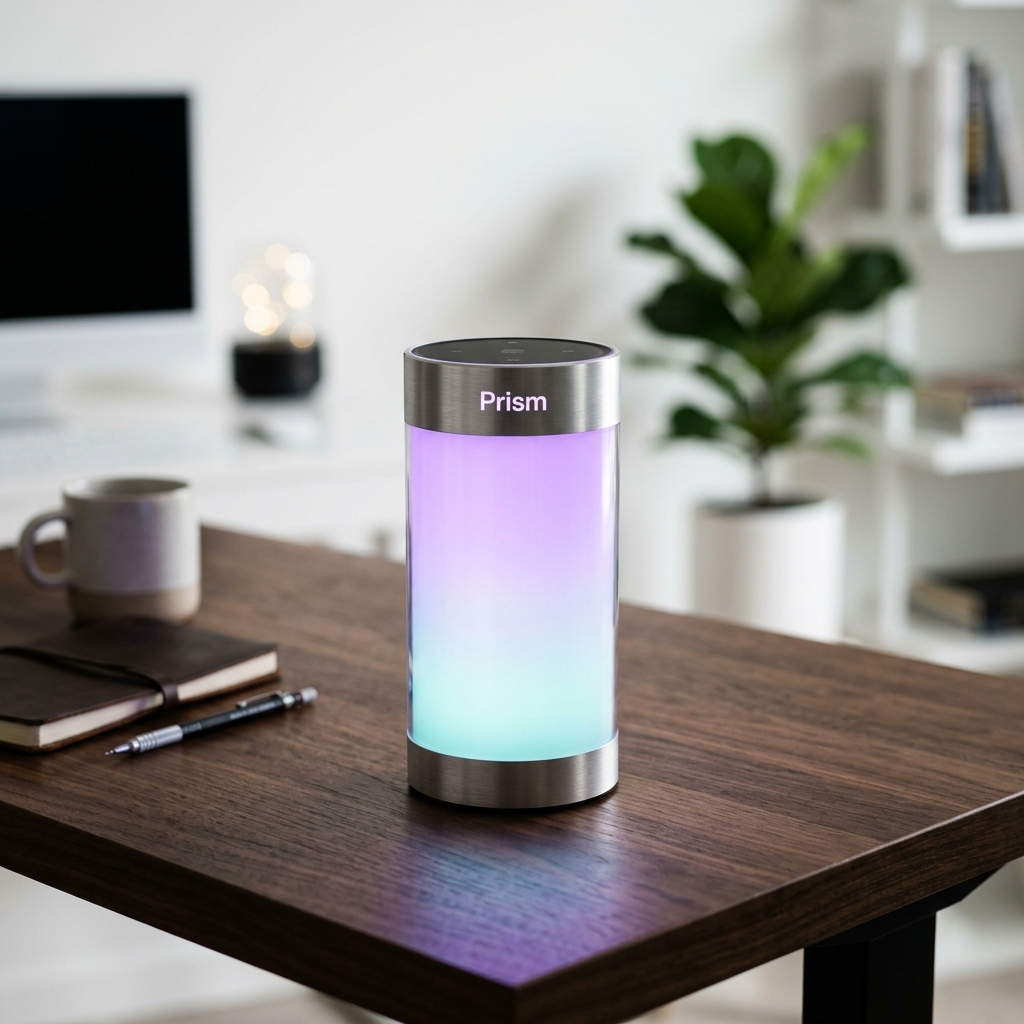
Generated result: Prism product shot — 1:1 aspect ratio, 4 credits
Voiceover
For ad-adjacent audio, we used Audio mode with voice Kore—a natural fit for calm, premium narration without sounding like a hard sell.
Settings: 30 seconds, 1 credit.
Prompt (verbatim):
“Meet Prism — the smart lamp that transforms any room into your personal sanctuary. With its brushed aluminum design and color-shifting ambient glow, Prism adapts to your mood, your music, your moment. From warm amber for focused work to soft violet for evening relaxation, every shade is effortlessly beautiful. Prism. Light the way you feel.”
The script mirrors the color triad established in video and stills so creative stays coherent across channels: one product story, repeated with different media strengths.
With the current workflow, this same read can also be applied directly to the finished Prism video via Add voiceover on the preview card, which returns a merged narrated MP4. We are keeping the standalone MP3 below because it is the reusable source asset for longer edits, homepage loops, and paid social variants.
Generated result: Prism voiceover — Kore voice, 30 seconds, 1 credit
Product copy
Finally, we used Text mode for long-form marketing language suitable for a landing page or press kit blurb.
Settings: 1 credit.
Prompt (verbatim):
“Write a premium product description for Prism — a smart ambient desk lamp…”
This keeps the brief constraint-heavy—materials, palette, audience, structure—so the output is immediately usable rather than generic.
Totals and economics
| Asset | Mode | Credits |
|---|---|---|
| Demo video | Video | 15 |
| Product photo | Image | 4 |
| Voiceover | Audio | 1 |
| Product copy | Text | 1 |
| Total | 21 |
Approximately $1.30 in underlying provider cost for the full package at the time of this run—everything generated from the same ImageLayer widget, without stitching together separate tools or accounts. That same 1-credit voiceover can also be merged back onto the demo clip for a narrated product video.
Keep exploring
- Brand Guidelines for Video: How a Luxury Brand Keeps AI Content On-Brand — Side-by-side comparison of generic vs branded video.
- AI Video Generation: Create Cinematic Product Demos and Social Clips — Cinematic clips with Veo 3.1 Fast and built-in templates.
- AI Voiceovers in Seconds: Generate Professional Audio with Text-to-Speech — Kore, Charon, and when to use Flash vs Pro TTS.
- Case Study: Building a Complete Brand Campaign with AI — NovaCraft Coffee — Full coffee campaign across image, video, audio, and text.
Build your own launch kit
Whether you are validating a concept, pitching investors, or shipping a campaign, you can iterate on video, imagery, voice, and copy in one place. Build your own product launch kit in the ImageLayer playground—match Prism’s structure with your product’s truth, then swap prompts until the set feels launch-ready.