Content Type Templates vs. Freeform Prompts: Which Approach Works Better?
Most users struggle with blank prompt boxes. Content type templates turn AI image generation into a fill-in-the-blanks experience your users will actually use.
You’ve seen this before. A user opens an AI image generator, stares at a blank text box, types “make me a good image for my blog post,” and gets something unusable. They try again with a longer prompt. Still not right. After three attempts, they close the tab and go back to stock photos.
The prompt box is the single biggest adoption barrier in AI image features. Not the AI quality. Not the speed. The blank box.
Why freeform prompts fail for most users
Prompt engineering is a skill. A good image prompt includes subject, composition, style, color mood, lighting, and format. Most people describe what they want in one vague sentence.
Here’s the gap:
What a user types: “Create a LinkedIn image for our Q1 results”
What the AI needs: “A professional stat highlight graphic with a clean, minimal style. Main number ‘47% growth’ in bold sans-serif type centered on a soft gradient background using navy (#1a2744) and white. Corporate, confident tone. 1200x627px for LinkedIn feed.”
The second prompt produces a usable image. The first produces something random. But nobody outside of AI enthusiasts writes prompts like the second example. And your users shouldn’t have to.
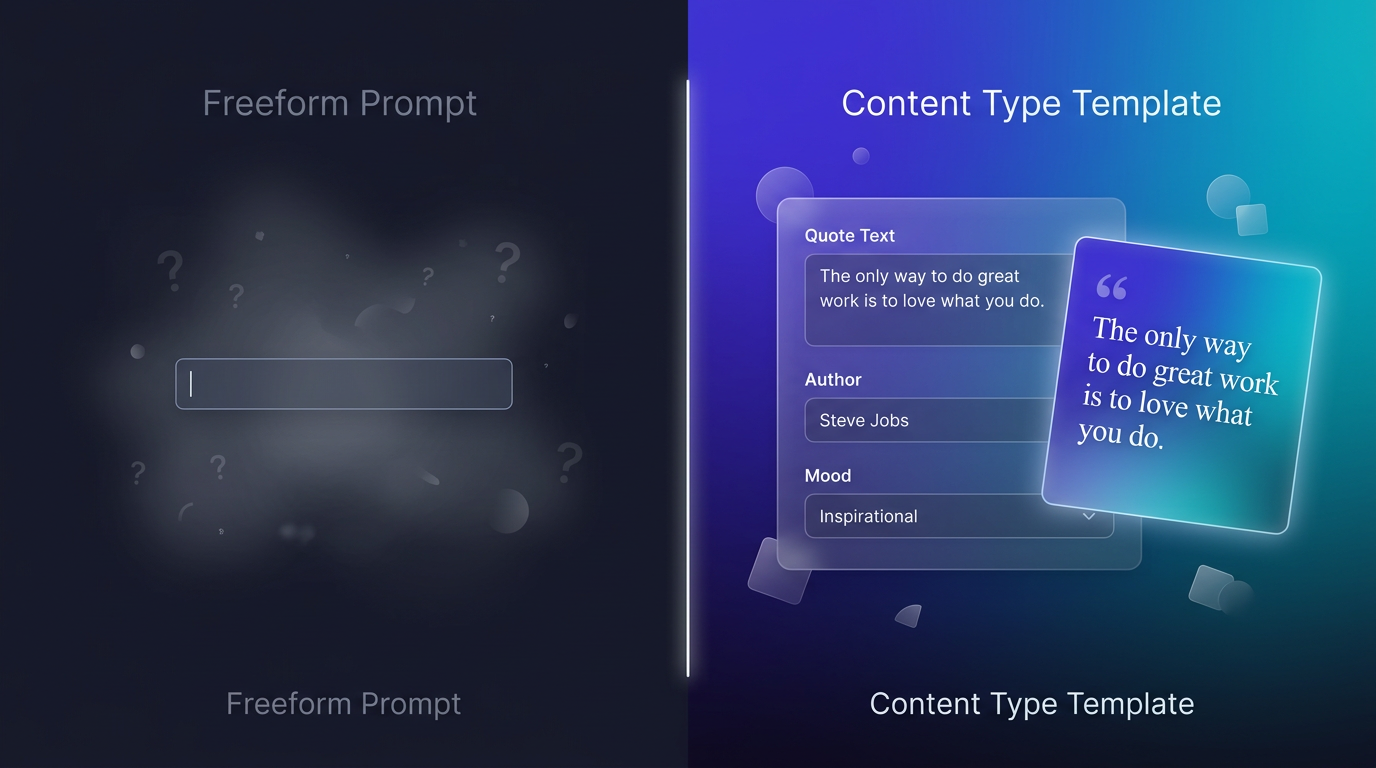
Left: the blank prompt box. Right: structured fields that guide the user to a good result.
The template approach
Content type templates replace the blank box with structured fields. Instead of asking “describe your image,” you ask specific questions:
Quote card template:
- Quote text: [paste the quote]
- Attribution: [who said it]
- Mood: [choose from: inspiring, professional, bold, warm]
Stat highlight template:
- Main number: [the metric]
- Headline: [what the number means]
- Context: [one-line explanation]
Blog promo template:
- Article title: [paste it]
- Summary: [one sentence]
- Category: [choose from options]
Each template knows what a good prompt looks like for that content type. The user fills in the blanks. The system constructs the full prompt behind the scenes — including brand guidelines, composition rules, and platform dimensions.
Adoption numbers tell the story
Teams that switch from freeform prompts to templates consistently see higher feature adoption. The reason is simple: templates reduce the cognitive load from “imagine and describe a complete visual” to “fill in three fields.”
Think about it from your user’s perspective. They’re a marketing coordinator who needs a LinkedIn image for a company announcement. They don’t want to learn prompt engineering. They want to type the announcement headline, click generate, and move on.
Templates make that possible.
When freeform still makes sense
Templates aren’t always the answer. Some users and use cases genuinely benefit from freeform input:
- Creative professionals who know exactly what they want and have the vocabulary to describe it
- Exploratory use cases where the user is brainstorming and doesn’t have a specific format in mind
- Custom one-off images that don’t fit any existing template category
The best approach isn’t either/or — it’s both.
The hybrid model
ImageLayer offers both. Users start with a content type template selector:
- Stat Highlight — for metrics and KPIs
- Quote Card — for testimonials, pull quotes, and attributions
- Blog Promo — for article promotion across channels
- Announcement — for company news and updates
- Infographic — for data visualization and process flows
Each template collects the right fields for that content type. But there’s also a freeform text input for users who want full control over their prompt.
Organizations can create up to three custom templates for their specific use cases. A real estate platform might add a “Property Listing” template. A fitness app might add a “Workout of the Day” template.
Templates + presets = zero guesswork
Content type templates handle what to generate. Platform presets handle how to size and compose it:
| Preset | Dimensions | Optimized for |
|---|---|---|
| LinkedIn Post | 1200 x 627 | Feed visibility, text readability |
| Instagram Post | 1080 x 1080 | Square crop, mobile-first |
| Instagram Story | 1080 x 1920 | Vertical, full-screen |
| X / Twitter | 1600 x 900 | Timeline display |
| Blog Header | 1200 x 630 | Article thumbnail, OG image |
| Email Banner | 600 x 200 | Email client compatibility |
A user picks “Quote Card” + “LinkedIn Post” and fills in the quote text. The system handles the prompt construction, brand guidelines, and sizing. Three fields. One click. Done.
What to optimize for
If you’re building AI image features into your product, optimize for this: how fast can a non-technical user go from “I need an image” to “I have an image I can use”?
Freeform prompts optimize for flexibility. Templates optimize for speed and consistency. For most teams and most use cases, speed and consistency win.
The users who want freeform control can still have it. But the 80% who want to fill in three fields and get back to their actual work? Templates are what makes AI image generation a feature they use daily instead of a novelty they try once.
See it in action
Try the playground to test both approaches — templates and freeform — without creating an account. Or sign up free to embed the widget in your own app.